Dynamic QR codes for verifiable credentials
How dynamic QR codes keep printed credentials verifiable: the two-layer architecture, the trust dependencies it creates, design constraints that survive a printer, and the governance rules large programs need.
Riya Sharma
Co-founder & CEO, CertSeal

Dynamic QR codes took 65% of the QR code market in 2024, and Mordor Intelligence projects them growing at a 19.2% compound annual growth rate through 2030, according to figures collected in Bitly’s QR code statistics roundup. That share shift matters more to credential issuers than to marketers. The question was never whether a dynamic QR code is a clever campaign trick. It’s whether your certificates, badges, and verification pages stay trustworthy after print, after reissue, and after the workflow that created them has been rewritten twice.
A credentialing team doesn’t need a scannable square. It needs a verification layer that stays current, survives reprints, supports revocation, and doesn’t turn every content change into a reissue project. Dynamic QR codes deliver that by separating the printed artifact from the live destination — and that same separation creates the trust and governance questions most QR guides skip entirely.
Why dynamic QR codes took over credentialing

Scanning is now habit, not novelty. Bitly’s State of QR Code Scans 2026 found scan volume rising far faster than code creation — QR code creation grew 0.5–7% across most regions while scans jumped 20–50% or more, with Europe up 42% and Latin America up 40% year over year. People aren’t tired of QR codes. They’ve learned to trust the gesture, which means the thing on the other side of the scan now carries real weight.
The practical advantage for issuers is simple: a printed credential can keep the same QR symbol while the destination behind it changes. A training provider can fix a verification page without reissuing documents. A university can move alumni and transcript workflows after the diplomas have been framed. An event team can keep badges usable while the details underneath them shift. The code is a persistent pointer; the backend carries the mutable state.
That mutability is exactly why dynamic codes fit governance-heavy programs better than marketing-grade QR tools. In credentialing, the destination may have to change for revocation, status updates, support workflows, or policy changes years later. A static code freezes that decision into ink. A dynamic code keeps the routing layer under issuer control, which is what you want when documents stay in circulation for a decade.
Editing is routine, not exceptional. Bitly reports that 69% of marketers update or redirect dynamic QR codes at least monthly, and only 14% rarely or never do. Translate that into credentialing and it stops being a marketing statistic: issuers revise destinations, preserve verification continuity, and maintain the trust layer without reprinting a single badge.
Practical rule: if a printed credential may outlive the page behind it, a static QR code is too brittle to use.
How a dynamic QR code actually works
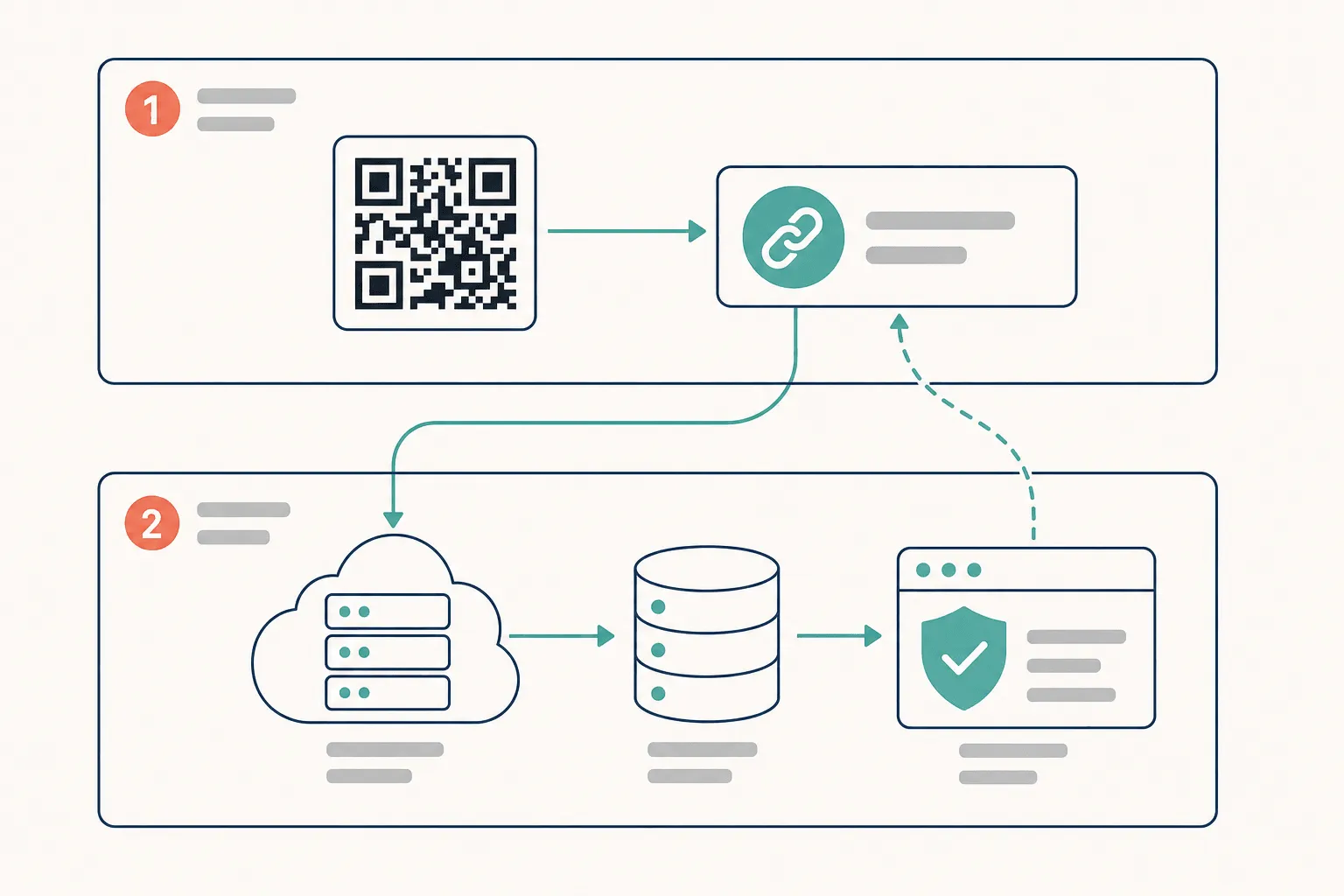
A dynamic QR code is a two-layer system. The printed matrix does not contain the credential. It contains a short redirect URL, and the real landing page is resolved server-side after the scan. That indirection is the whole trick: change the resolution rule, and every printed copy in the world follows without being reprinted.
The redirect layer does more than forward traffic. It resolves the credential record, applies current status, and can log the scan — time, device class, coarse location — before returning a response. One printed badge keeps working while the backend updates verification status, recipient messaging, or revocation state centrally.
It also creates a dependency. Every scan now relies on the redirect service and the verification endpoint being reachable and behaving correctly. If either fails, the printed code still scans perfectly and the user still lands somewhere wrong: an error page, stale content, or a page that no longer reflects the credential’s actual status. Static codes fail loudly, at print time. Dynamic codes fail quietly, in production, years later.
The payload stays small, and that’s a design win. A short redirect URL of roughly 25 to 30 characters typically fits a Version 2 or Version 3 symbol — 25×25 or 29×29 modules — rather than the dense grid a full credential URL with a signed token would demand. On a certificate border or a lanyard badge, that difference decides whether the code sits cleanly in the layout or crowds it.
For teams integrating at scale, the interesting part isn’t the image, it’s the routing control behind it. Generate the code when the credential record is created, then change the destination logic later — status checks, expiry behaviour, recipient-specific views — without touching the artifact. That’s a backend workflow, which is why it belongs behind an API like the CertSeal REST API rather than in a design tool.
Static vs dynamic QR codes for credentials
Static and dynamic codes are not interchangeable here. A static code encodes the destination directly into the printed symbol. A dynamic code routes the scan through a modifiable short URL. The difference is trivial on paper and enormous in production, because credentials don’t behave like campaign links.
| Feature | Static QR codes | Dynamic QR codes |
|---|---|---|
| Editability after printing | Destination is fixed forever | Destination changes without reprinting |
| Analytics | None at the code level | Scan-level telemetry through the redirect layer |
| Trust model | Fewer moving parts, but no live revocation path | Depends on the redirect service and verification endpoint staying up |
| Long-term verification | Works only if the destination never moves | Fits status updates, revocation, and reissue |
| Symbol density | Grows with URL length | Stays small — short redirect payload |
| Operational overhead | Cheap at launch, expensive when anything changes | More design upfront, far less reissuance later |
Static codes still have a place: a permanent internal notice, a fixed location URL, a one-time handout where the destination genuinely will never change. They break the moment a credential has to stay valid across semesters, cohorts, or event cycles.
Dynamic codes belong wherever the issuer must keep control of verification without touching the printed artifact — certificates that may be revoked, badges that carry status, alumni credentials that should still resolve a decade after the campaign that produced them. The question isn’t whether the code scans. It’s whether the scan still points at the truth.
The trust dependencies nobody puts in the sales deck
The hard part of dynamic QR codes isn’t editability. It’s that editability is a privilege someone can abuse. A redirect-based system depends on the QR platform’s uptime, its access controls, and its ability to keep the destination under issuer control. Weaken any of those and a printed code outlives the integrity of the page behind it.
The threat is not hypothetical. The FBI’s Internet Crime Complaint Center issued a public service announcement on 31 July 2025 about criminals mailing unsolicited packages containing QR codes that harvest personal and financial information or push malware onto the scanner’s phone. A QR code is an opaque instruction that people follow without reading. Everything downstream of that scan has to earn the trust the gesture already assumes.
Verification should not depend on trust in the printed artifact. It should depend on the server’s current policy.
So push the sensitive logic out of the code entirely. The code points at a verification endpoint; the endpoint checks the credential record, the issuer’s signature, and any revocation flag before it renders a result. That’s how the wider verifiable-credentials ecosystem handles it — the W3C’s Bitstring Status List exists precisely so a verifier can tell whether a credential has been revoked or suspended without contacting the issuer, and the Verifiable Credentials Data Model 2.0 gives the record a cryptographic proof anyone can check.
Three controls matter more than anything else on the feature list:
- Who can change a destination, and whether that change is logged, reviewable, and reversible.
- What the endpoint returns when a credential is revoked — an honest “revoked” state, not a 404 that reads as a broken link.
- How long the verification URL is guaranteed to resolve, because printed credentials surface in folders and employer inboxes long after issuance.
Marketing-first QR tools optimize for campaign flexibility. Credentialing needs long-lived assurance and controlled redirection. If you’re building badge workflows, how to make a badge that recipients actually trust covers the metadata side of the same problem, and credential verification services compared looks at how different platforms handle revocation and portability.
Design constraints the printed square still has to survive
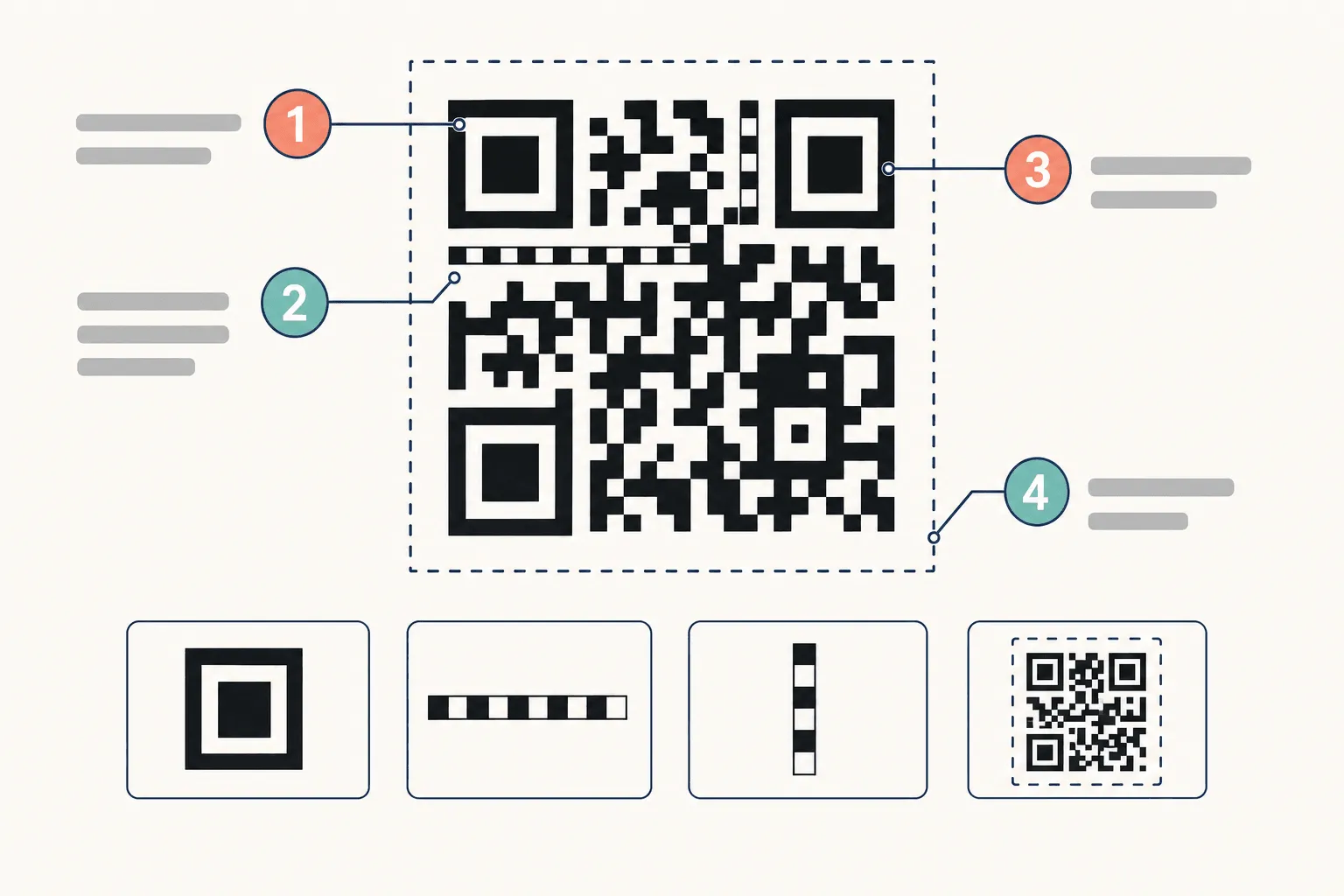
QR codes are not decorative noise. Under ISO/IEC 18004, the symbol carries fixed structures a scanner needs before it can read a single bit of payload: three position markers at the corners for orientation, timing patterns that establish the module grid, and a format information strip encoding error correction level and mask pattern. Denso Wave, which invented the format, also specifies the margin: a QR code “requires a four-module wide margin at all sides of a symbol”.
Size follows the payload. Symbols run from Version 1 at 21×21 modules to Version 40 at 177×177, four modules added per side per version. A shorter encoded URL produces a smaller symbol, and a smaller symbol is easier to place on a certificate, a lanyard, or an event badge without crowding the layout.
Density also decides whether the scan works in the real world. Angled phone photos, low-resolution office printers, laminate glare, and a code half-covered by a thumb are all harder on a dense grid than a sparse one. A compact dynamic code doesn’t make the credential safer by itself — it just gives the scanner more room to recover the fixed markers that have to survive the distortion.
Which leads to the design rule that actually matters: keep identity data out of the code. Use the QR code as a durable pointer to a signed verification endpoint and let the server enforce the policy. The printed artifact stays stable while the rules stay where they can be updated, revoked, and audited. Practically, that means four things on the layout: adequate quiet zone, high contrast (dark modules on light stock, never the reverse), a printed size that holds up at the distance people will actually scan from, and a human-readable verification URL beside the code as a fallback. How to design a certificate covers where that block sits without wrecking the composition.
The code should be small because the intelligence belongs on the server, not inside the printed square.
What this looks like in real programs
Training providers feel it first. A cohort finishes, certificates go out, and then the corrections arrive — a misspelled name, a course status change, a policy update. Dynamic QR codes let the issuer update the destination or the credential status without reissuing every printed copy, which preserves recipient ownership and kills a week of manual cleanup.
Universities use the same mechanism on a longer timescale. Alumni credentials need to stay valid for decades while everything around them changes: login methods, support pages, brand refreshes, whole registrar systems. The diploma keeps pointing at a live verification page while the institution rewires the destination behind it.
Event teams care about temporary status. Access level, check-in state, room assignment — all of it changes while printed badges are already on lanyards. The code stays fixed; the backend changes what the scan reveals.
Bulk operations are where this becomes practical rather than theoretical. Credentials get issued from CSV, Google Sheets, a REST API, or automation tooling like Zapier, with the QR attached to a verifiable URL at generation time — see the bulk generator and the batches documentation for field mapping and error handling. If the same record also emits PDFs and PNGs, one source of truth flows into email delivery, print production, and verification without anyone duplicating data by hand.
That consistency is the whole point. One record should drive the credential, the QR destination, and the live verification page. Any other arrangement eventually produces a mismatch between what’s printed and what the issuer intends to prove.
Governance when there are 40,000 of them
A single dynamic code is easy to reason about. Forty thousand of them, spread across programs and owned by three different teams, is a governance problem wearing a technical costume.
The first failure mode is drift. When teams update destinations independently, the same credential family starts resolving to different experiences, and support can no longer answer “what should this show?” without an archaeology session.
The second is unowned redirect logic. Large programs need to know which changes are routine, which need review, and which should never happen without approval — particularly in multi-country deployments where scans arrive from different devices, regions, and languages. Raw scan counts don’t tell you whether the person found a valid record, hit a stale redirect, or landed on a page in a language they don’t read.
Operational rule: if a code can be updated easily, someone has to own when it should be updated, and why.
Analytics help, with a caveat. Scan telemetry is excellent for spotting broken links and usage patterns, and useless as evidence of credential validity or recipient engagement. In credentialing, scan data supports operations; it doesn’t replace them. Launching a certification program covers the ownership model that has to exist before any of this scales.
An implementation checklist for credentialing platforms
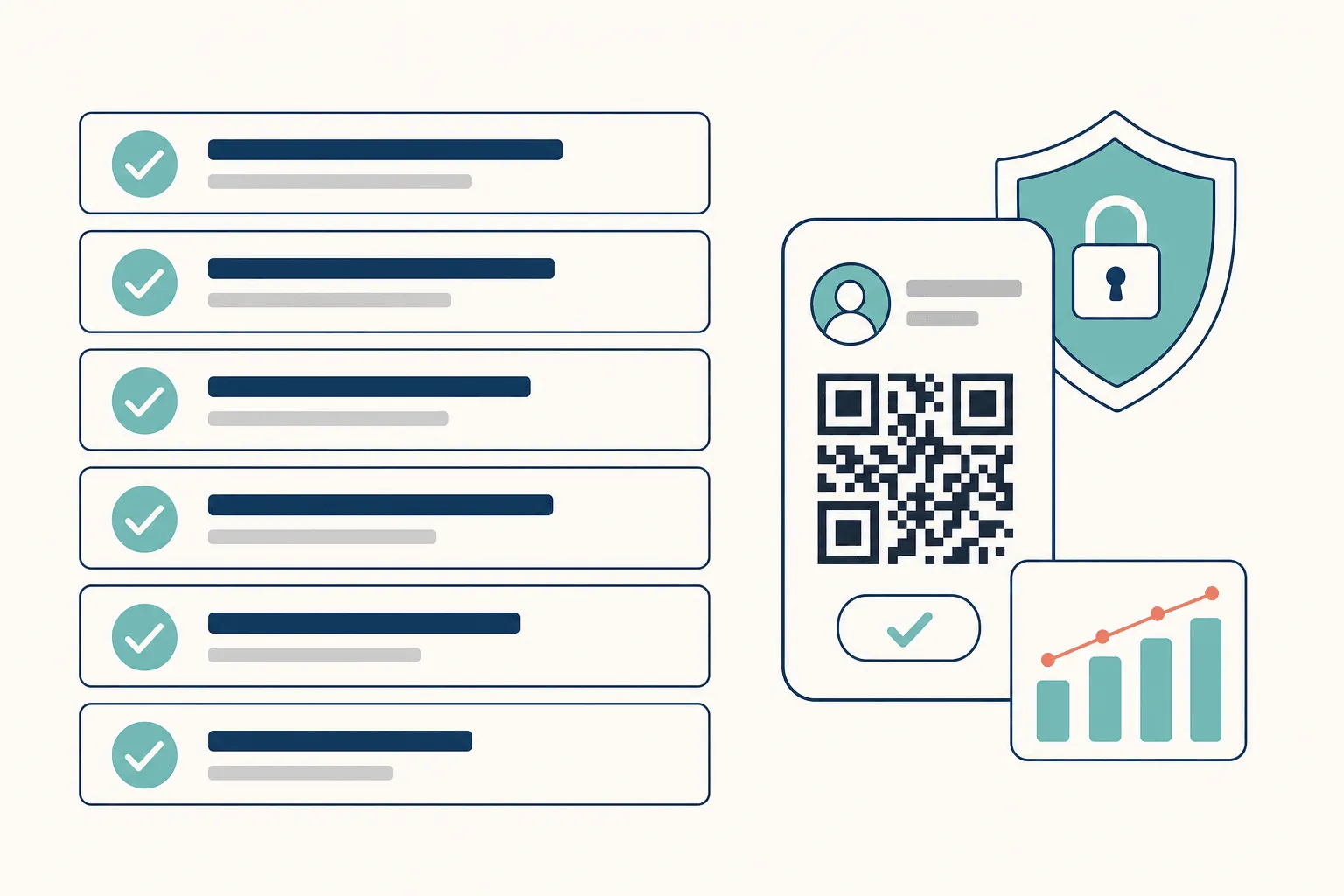
Start with the verification endpoint, not the QR generator. In order:
- Design the endpoint first. It should resolve the credential, state the current status in plain language, and support revocation and reissue without changing the printed code.
- Generate the code at record creation. Issue through a REST workflow so the credential and its pointer are created in the same transaction, never stitched together afterwards.
- Wire status changes to webhooks. Revocation, expiry, and reissue should propagate to downstream systems automatically rather than through a spreadsheet someone maintains.
- Sign the record. A verification page that only asserts validity is a claim. One backed by a cryptographic proof is evidence.
- Monitor resolution, not just scans. Track whether redirects resolve, how fast the verification page loads on mobile, and whether any destination has drifted from policy.
- Test the printed path before launch. Print it, scan it at arm’s length under office lighting, then scan it again from a photocopy. Most QR failures in credentialing are print failures, not code failures.
A workable stack ends up with the same four parts: bulk generation, cryptographic signing, mobile-friendly verification views, and automation hooks into systems you already run. CertSeal combines QR verification, bulk issuance, revocation-aware status pages, and REST and webhook automation in one workflow, which is the shape most teams end up building anyway when they replace a manual certificate process.
The final rule is short: pick a platform that treats the QR code as part of a verifiable record, not as a marketing asset with a nicer logo.
Frequently asked questions
Can a dynamic QR code be changed after certificates are printed?
Yes — that’s the defining feature. The printed symbol encodes a short redirect URL, and the destination behind it is resolved server-side at scan time. You change the routing rule and every printed copy follows, including the ones already framed on someone’s wall.
Are dynamic QR codes less secure than static ones?
They have a different risk profile, not a worse one. A static code can’t be redirected, but it also can’t be revoked, corrected, or retired. A dynamic code adds a redirect layer that must be access-controlled and monitored. For credentials, the ability to revoke usually outweighs the added surface — provided destination changes are permissioned and logged.
What happens to a printed credential if the verification service goes down?
The code still scans and the scan still fails, which is why uptime and URL longevity belong in the vendor conversation. Ask how long verification URLs are guaranteed to resolve, what the export path looks like, and whether credentials remain verifiable if you change platforms. Credential verification services compared goes through those questions vendor by vendor.
How big should the QR code be on a printed certificate?
Big enough to survive the scan distance, with the four-module quiet zone intact on all sides. On A4 stock, roughly 2–3 cm square is a reliable starting point for arm’s-length scanning; go larger for lanyard badges scanned across a check-in desk. Keep dark modules on a light background and never print the code over a texture or watermark.
Do I need a dynamic QR code if I already issue digital certificates?
If the credential exists as a live record with a verification URL, the QR code is just a second door into the same room — and it’s the door that matters for anything printed, framed, or handed over in person. How to issue digital certificates covers the delivery side; the QR code is what keeps the paper version honest.
Make the printed square outlive the print run
Dynamic QR codes are worth the extra architecture for one reason: they let a credential stay true after it’s left your control. The printed artifact stops being the system of record and becomes a pointer into one, which is the only arrangement where revocation, correction, and reissue are possible at all.
Build it in the right order — endpoint first, code second, governance before scale — and a certificate printed today still verifies correctly in 2036.
Start from a structure that already has the proof layer in place: browse the template library, customize it in the certificate maker, and issue in cohorts with the bulk generator. The free tier covers 100 certificates a year with no credit card, and pricing has the full breakdown when you outgrow it.
Start free with CertSeal and issue your first QR-verifiable credential today.
Related reading
- 10 credential verification services, compared — how different platforms handle verification, revocation, and portability
- How to make a badge that recipients actually trust — the metadata and proof layer behind the graphic
- How to design a certificate that looks professional — where the QR code and verification block belong on the page
- How to issue digital certificates in 2026 — delivery, verification, and analytics end to end
- Digital badges vs digital certificates — which format to issue, and when to issue both
Keep reading
Certificates
Completion of course certificates: a practical issuer guide
What a completion of course certificate actually claims, the five fields it needs, static PDF vs verifiable credential, and how to run an issuance process you can still defend two years later.
Certificates
What is a certificate? Types, uses, and how verification works
A certificate is issuer-signed proof of a defined achievement. Here's what it actually claims, how completion, achievement, and competency differ, and why verification decides whether it counts.